
博主为博客DIY相册模块,初版基于light主题创建双模板,以独立页+富文本展示图片,配合插件管理目录扫描与上传,但维护繁琐。后优化为参数控制,省去手动复制HTML和独立页维护,后台插件直接完成相册及照片管理,大幅简化操作流程。
相册模块算是很多博客中不可或缺的一个板块了,这个主题本身是没有相册模块功能的,因此之前的相册模块也是博主DIY来的,中间也算是折腾了很久,也在不断的优化完善。那都是相册模块来时的路啊。
想法与诞生历程:https://liuqingwushui.top/archives/23/
相册模块
相册目前可以实现多相册,相册加密,懒加载,图片预览。瑕疵肯定还是有的。因为图片的上传和相册图片展示还涉及到半手动,并不能达到全部后台控制。
因为都是二次开发 或者引用插件调试出来的,因此也没法提供独立的插件或者全部的说明,毕竟这个相册是针对这个主题打造的,有一定针对性,博主只能简要说下思路以及关键代码。
3.1 相册展示效果
首先是做出相册的展示效果,这里是基于light(https://demo.typechx.com/light/)这个主题来的,通过html+js+css打造出来类似的图片展示效果。然后创建对应的模板页面。总所周知,博客的模板页面,除了一些导航侧边啥的,有一个核心的div内容,里面就是你自定义要展示的东西。
所以,只要提取出效果的html页面 ,要引入进去就不难了。
3.2 动态相册
博主针对相册效果一共创建了两个模板页面,一个展示相册列表,一个是展示相册图片。相册列表一般改动不多,但是相册图片里的图片是动态的,所以这里投机取巧了一下,一个相册对应一个独立页面,并应用相册图片的模板页面,让相册图片以富文本 的方式插入来实现动态的展示相册图片效果。
相册列表对应一个独立页面,用来渲染相册的信息。
page.album.php
通过解析自定义字段,渲染相册列表封面图,各个相册基本信息及跳转的相册图片链接页面。
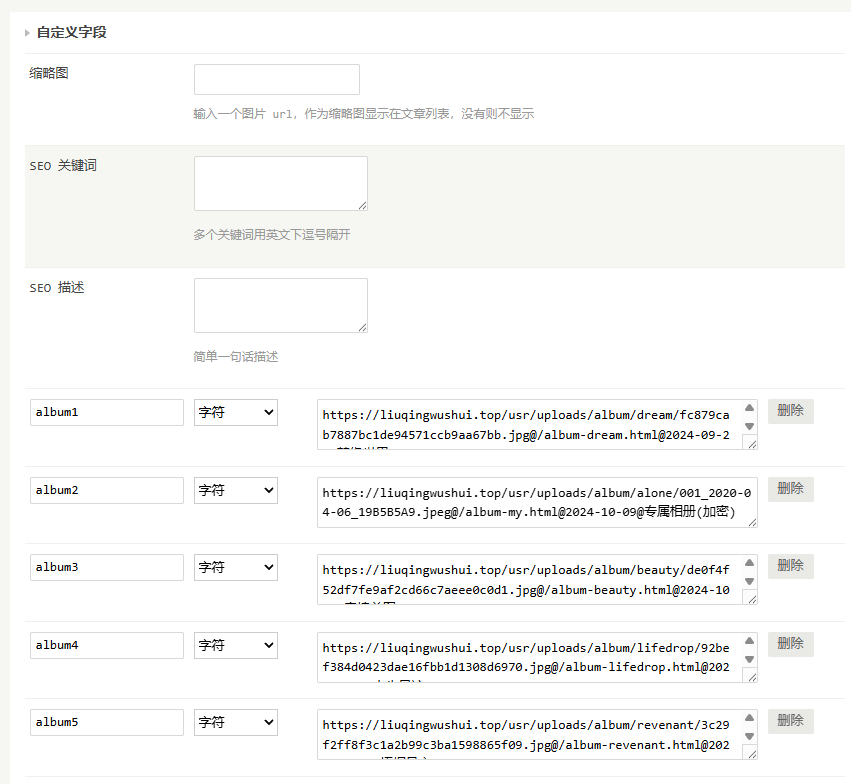
page.album-img.php
相册图片页面,就是用来展示相册照片的,一个相册里有多个图片。模板是用的相册图片模板,只是展示的照片不一样。因为没有做参数动态查询区分,所以是根据一个独立页面对应一个相册来做的。而这也给后期维护埋下了不便。

3.3 相册图片管理
这么说一般人可能看不懂,毕竟是针对typecho有一定了解的人而言,博主也是捣鼓了一段时间才搞清楚的,独立页面和模板页面,插件等等这些的关联。不懂就不懂吧,下面这段代码功能是自动扫面目录列表及目录下的图片,并实现对图片的上传和删除。这里是用来做相册图片的管理插件的,用做普通的目录图片管理也行。结合这个文件,博主可以完成照片的上传的管理,和前面的两个模板结合。DIY出了相册模块。核心就是 文件目录就是相册的原理。一个文件目录就是一个相册,将该文件目录的照片扫描出来信息,构建成一段html,再将该html手动复制到独立页内容中,就展示出了对应的照片效果。
<!DOCTYPE html>
<html>
<head>
    <meta charset="UTF-8">
    <meta name="viewport" content="width=device-width, initial-scale=1.0">
    <title>图片上传和目录扫描</title>
</head>
<body>
    <style>
        /* 基础样式 */
body {
    font-family: 'Arial', sans-serif;
    line-height: 1.6;
    color: #333;
    background-color: #f4f4f4;
    padding: 20px;
    margin: 0;
}

h1 {
    text-align: center;
    color: #333;
    margin-bottom: 20px;
}

/* 表单和按钮样式 */
.photo{
    max-width: 600px;
    margin: 0 auto;
    background: #fff;
    padding: 20px;
    border-radius: 8px;
    box-shadow: 0 2px 4px rgba(0, 0, 0, 0.1);
}
.photo .btn{
    display: flex;
    gap: 10px;
}
select,
input[type="file"],
input[type="submit"] {
    width: 100%;
    padding: 10px;
    margin-bottom: 10px;
    border: 1px solid #ddd;
    border-radius: 4px;
    box-sizing: border-box;
}

input[type="submit"] {
    border: none;
    background-color: #467B96;
    border-radius: 2px;
    color: #FFF;
    color: white;
    border: none;
    cursor: pointer;
}

input[type="submit"]:hover {
    background-color: #4cae4c;
}

/* 图片网格样式 */
.scrollable{
    margin: 20px auto;
    max-width: 600px;
    background: #fff;
    padding: 10px;
    height: 400px;
    overflow: auto;
    border-radius: 10px;
    border: 1px solid #dedede;
}
.image-grid {
    display: flex;
    flex-wrap: wrap;
    gap: 10px; /* 卡片之间的间距 */
    justify-content: center;
    margin: 20px auto;
    max-width: 600px;
    height: 500px;
    overflow: auto;
}

.card {
    width: calc(33.333% - 10px); /* 每行三个卡片,减去间距 */
    background: #fff;
    border: 1px solid #ddd;
    border-radius: 8px;
    overflow: hidden;
    text-align: center;
    display: flex;
    flex-direction: column;
    justify-content: space-between;
}

.card img {
    height: 150px;
    width: auto;
    margin: 0 auto;
    display: block; /* 去除图片下方的空白间隙 */
}

.delete-btn {
    background-color: #f44336;
    color: white;
    border: none;
    padding: 10px;
    cursor: pointer;
    width: 100%;
    border-radius: 0 0 4px 4px; /* 删除按钮圆角 */
}

.delete-btn:hover {
    background-color: #e53935;
}

/* 响应式布局调整 */
@media (max-width: 600px) {
    .card {
        width: calc(50% - 10px); /* 在小屏幕上每行显示两个卡片 */
    }
}
    </style>
    <script>
        "use strict";

function _typeof(obj) { "@babel/helpers - typeof"; if (typeof Symbol === "function" && typeof Symbol.iterator === "symbol") { _typeof = function _typeof(obj) { return typeof obj; }; } else { _typeof = function _typeof(obj) { return obj && typeof Symbol === "function" && obj.constructor === Symbol && obj !== Symbol.prototype ? "symbol" : typeof obj; }; } return _typeof(obj); }

!function (global, factory) {
  (typeof exports === "undefined" ? "undefined" : _typeof(exports)) === "object" && typeof module !== "undefined" ? module.exports = factory() : typeof define === "function" && define.amd ? define(factory) : (global = global || self, global.cocoMessage = factory());
}(void 0, function () {
  "use strict";

  var msgWrapper = c({
    className: "coco-msg-stage"
  });

  function c(args, children) {
    var el = document.createElement("div");

    for (var key in args) {
      var element = args[key];

      if (key == "className") {
        key = "class";
        el.setAttribute(key, element);
      } else if (key[0] == "_") {
        el.addEventListener(key.slice(1), element);
      }
    }

    if (typeof children == "string") {
      el.innerHTML = children;
    } else if (_typeof(children) == "object" && children.tagName) {
      el.appendChild(children);
    } else if (children) {
      for (var i = 0; i < children.length; i++) {
        var child = children[i];
        el.appendChild(child);
      }
    }

    return el;
  }

  function addAnimationEnd(el, fn) {
    ["a", "webkitA"].forEach(function (prefix) {
      var name = prefix + "nimationEnd";
      el.addEventListener(name, function () {
        fn();
      });
    });
  }

  function css(el, css) {
    for (var key in css) {
      el.style[key] = css[key];
    }

    if (el.getAttribute("style") === "") {
      el.removeAttribute("style");
    }
  }

  function addClass(el, s) {
    var c = el.className || "";

    if (!hasClass(c, s)) {
      var arr = c.split(/\s+/);
      arr.push(s);
      el.className = arr.join(" ");
    }
  }

  function hasClass(c, s) {
    return c.indexOf(s) > -1 ? !0 : !1;
  }

  function removeClass(el, s) {
    var c = el.className || "";

    if (hasClass(c, s)) {
      var arr = c.split(/\s+/);
      var i = arr.indexOf(s);
      arr.splice(i, 1);
      el.className = arr.join(" ");
    }

    if (el.className === "") {
      el.removeAttribute("class");
    }
  }

  var initArgs = {
    msg: "",
    duration: 2000,
    showClose: false
  };
  var cocoMessage = {
    info: function info() {
      initConfig(arguments, "info");
    },
    success: function success() {
      initConfig(arguments, "success");
    },
    warning: function warning() {
      initConfig(arguments, "warning");
    },
    error: function error() {
      initConfig(arguments, "error");
    },
    loading: function loading() {
      return initConfig(arguments, "loading");
    },
    destroyAll: function destroyAll() {
      _destroyAll();
    },
    config: function config(obj) {
      for (var key in obj) {
        if (Object.hasOwnProperty.call(obj, key)) {
          if (obj[key] !== undefined) {
            initArgs[key] = obj[key];
          }
        }
      }
    }
  };

  function initConfig(obj, type) {
    var args = {};

    for (var key in initArgs) {
      args[key] = initArgs[key];
    }

    for (var i = 0; i < obj.length; i++) {
      var it = obj[i];

      if (it !== undefined) {
        if (typeof it == "string" || _typeof(it) == "object") {
          args.msg = it;
        } else if (typeof it == "boolean") {
          args.showClose = it;
        } else if (typeof it == "function") {
          args.onClose = it;
        } else if (typeof it == "number") {
          args.duration = it;
        }
      }
    }

    args.type = type;
    return createMsgEl(args);
  }

  function createMsgEl(args) {
    var type = args.type,
        duration = args.duration,
        msg = args.msg,
        showClose = args.showClose,
        onClose = args.onClose;
    var closable = duration === 0;
    var iconObj = getIconObj();

    if (type == "loading") {
      msg = msg === "" ? "正在加载,请稍后" : msg;
      closable = showClose;
      duration = 0;
    }

    var el = c({
      className: "coco-msg-wrapper"
    }, [c({
      className: "coco-msg coco-msg-fade-in " + type
    }, [c({
      className: "coco-msg-icon"
    }, iconObj[type]), c({
      className: "coco-msg-content"
    }, msg), c({
      className: "coco-msg-wait " + (closable ? "coco-msg-pointer" : ""),
      _click: function _click() {
        if (closable) {
          closeMsg(el, onClose);
        }
      }
    }, getMsgRight(closable))])]);
    var anm = el.querySelector(".coco-msg__circle");

    if (anm) {
      css(anm, {
        animation: "coco-msg_" + type + " " + duration + "ms linear"
      });

      if ("onanimationend" in window) {
        addAnimationEnd(anm, function () {
          closeMsg(el, onClose);
        });
      } else {
        setTimeout(function () {
          closeMsg(el, onClose);
        }, duration);
      }
    }

    if (type == "loading" && duration !== 0) {
      setTimeout(function () {
        closeMsg(el, onClose);
      }, duration);
    }

    if (!msgWrapper.children.length) {
      document.body.appendChild(msgWrapper);
    }

    msgWrapper.appendChild(el);
    css(el, {
      height: el.offsetHeight + "px"
    });
    setTimeout(function () {
      removeClass(el.children[0], "coco-msg-fade-in");
    }, 300);

    if (type == "loading") {
      return function () {
        closeMsg(el, onClose);
      };
    }
  }

  function getMsgRight(showClose) {
    if (showClose) {
      return "\n    <svg class=\"coco-msg-close\" viewBox=\"0 0 1024 1024\" version=\"1.1\" xmlns=\"http://www.w3.org/2000/svg\" p-id=\"5514\"><path d=\"M810 274l-238 238 238 238-60 60-238-238-238 238-60-60 238-238-238-238 60-60 238 238 238-238z\" p-id=\"5515\"></path></svg>\n    ";
    } else {
      return "<svg class=\"coco-msg-progress\" viewBox=\"0 0 33.83098862 33.83098862\" xmlns=\"http://www.w3.org/2000/svg\">\n    <circle class=\"coco-msg__background\" cx=\"16.9\" cy=\"16.9\" r=\"15.9\"></circle>\n    <circle class=\"coco-msg__circle\" stroke-dasharray=\"100,100\" cx=\"16.9\" cy=\"16.9\" r=\"15.9\"></circle>\n    </svg>\n    ";
    }
  }

  function closeMsg(el, cb) {
    if (!el) return;
    css(el, {
      padding: 0,
      height: 0
    });
    addClass(el.children[0], "coco-msg-fade-out");
    cb && cb();
    setTimeout(function () {
      if (!el) return;
      var has = false;

      for (var i = 0; i < msgWrapper.children.length; i++) {
        if (msgWrapper.children[i] === el) {
          has = true;
        }
      }

      has && removeChild(el);
      el = null;

      if (!msgWrapper.children.length) {
        has && removeChild(msgWrapper);
      }
    }, 300);
  }

  function getIconObj() {
    return {
      info: "\n    <svg t=\"1609810636603\" viewBox=\"0 0 1024 1024\" version=\"1.1\" xmlns=\"http://www.w3.org/2000/svg\" p-id=\"3250\"><path d=\"M469.333333 341.333333h85.333334v469.333334H469.333333z\" fill=\"#ffffff\" p-id=\"3251\"></path><path d=\"M469.333333 213.333333h85.333334v85.333334H469.333333z\" fill=\"#ffffff\" p-id=\"3252\"></path><path d=\"M384 341.333333h170.666667v85.333334H384z\" fill=\"#ffffff\" p-id=\"3253\"></path><path d=\"M384 725.333333h256v85.333334H384z\" fill=\"#ffffff\" p-id=\"3254\"></path></svg>\n    ",
      success: "\n    <svg t=\"1609781242911\" viewBox=\"0 0 1024 1024\" version=\"1.1\" xmlns=\"http://www.w3.org/2000/svg\" p-id=\"1807\"><path d=\"M455.42 731.04c-8.85 0-17.75-3.05-24.99-9.27L235.14 553.91c-16.06-13.81-17.89-38.03-4.09-54.09 13.81-16.06 38.03-17.89 54.09-4.09l195.29 167.86c16.06 13.81 17.89 38.03 4.09 54.09-7.58 8.83-18.31 13.36-29.1 13.36z\" p-id=\"1808\" fill=\"#ffffff\"></path><path d=\"M469.89 731.04c-8.51 0-17.07-2.82-24.18-8.6-16.43-13.37-18.92-37.53-5.55-53.96L734.1 307.11c13.37-16.44 37.53-18.92 53.96-5.55 16.43 13.37 18.92 37.53 5.55 53.96L499.67 716.89c-7.58 9.31-18.64 14.15-29.78 14.15z\" p-id=\"1809\" fill=\"#ffffff\"></path></svg>\n    ",
      warning: "\n    <svg t=\"1609776406944\" viewBox=\"0 0 1024 1024\" version=\"1.1\" xmlns=\"http://www.w3.org/2000/svg\" p-id=\"18912\"><path d=\"M468.114286 621.714286c7.314286 21.942857 21.942857 36.571429 43.885714 36.571428s36.571429-14.628571 43.885714-36.571428L585.142857 219.428571c0-43.885714-36.571429-73.142857-73.142857-73.142857-43.885714 0-73.142857 36.571429-73.142857 80.457143l29.257143 394.971429zM512 731.428571c-43.885714 0-73.142857 29.257143-73.142857 73.142858s29.257143 73.142857 73.142857 73.142857 73.142857-29.257143 73.142857-73.142857-29.257143-73.142857-73.142857-73.142858z\" p-id=\"18913\" fill=\"#ffffff\"></path></svg>\n    ",
      error: "\n    <svg t=\"1609810716933\" viewBox=\"0 0 1024 1024\" version=\"1.1\" xmlns=\"http://www.w3.org/2000/svg\" p-id=\"5514\"><path d=\"M810 274l-238 238 238 238-60 60-238-238-238 238-60-60 238-238-238-238 60-60 238 238 238-238z\" p-id=\"5515\" fill=\"#ffffff\"></path></svg>\n    ",
      loading: "\n    <div class=\"coco-msg_loading\">\n    <svg class=\"coco-msg-circular\" viewBox=\"25 25 50 50\">\n      <circle class=\"coco-msg-path\" cx=\"50\" cy=\"50\" r=\"20\" fill=\"none\" stroke-width=\"4\" stroke-miterlimit=\"10\"/>\n    </svg>\n    </div>\n    "
    };
  }

  function removeChild(el) {
    el && el.parentNode.removeChild(el);
  }

  function _destroyAll() {
    for (var i = 0; i < msgWrapper.children.length; i++) {
      var element = msgWrapper.children[i];
      closeMsg(element);
    }
  }

  window.addEventListener('DOMContentLoaded', function () {
    insertCssInHead();
  });

  function insertCssInHead() {
    var doc = document;

    if (doc && doc.head) {
      var head = doc.head;

      var _css = doc.createElement('style');

      var cssStr = "\n\n[class|=coco],[class|=coco]::after,[class|=coco]::before{box-sizing:border-box;outline:0}.coco-msg-progress{width:13px;height:13px}.coco-msg__circle{stroke-width:2;stroke-linecap:square;fill:none;transform:rotate(-90deg);transform-origin:center}.coco-msg-stage:hover .coco-msg__circle{-webkit-animation-play-state:paused!important;animation-play-state:paused!important}.coco-msg__background{stroke-width:2;fill:none}.coco-msg-stage{position:fixed;top:20px;left:50%;width:auto;transform:translate(-50%,0);z-index:3000}.coco-msg-wrapper{position:relative;left:50%;transform:translate(-50%,0);transform:translate3d(-50%,0,0);transition:height .3s ease,padding .3s ease;padding:6px 0;will-change:transform,opacity}.coco-msg{padding:15px 21px;border-radius:3px;position:relative;left:50%;transform:translate(-50%,0);transform:translate3d(-50%,0,0);display:flex;align-items:center}.coco-msg-content,.coco-msg-icon,.coco-msg-wait{display:inline-block}.coco-msg-icon{position:relative;width:13px;height:13px;border-radius:100%;display:flex;justify-content:center;align-items:center}.coco-msg-icon svg{position:absolute;top:50%;left:50%;transform:translate(-50%,-50%);width:11px;height:11px}.coco-msg-wait{width:20px;height:20px;position:relative;fill:#4eb127}.coco-msg-wait svg{position:absolute;top:50%;left:50%;transform:translate(-50%,-50%)}.coco-msg-close{width:14px;height:14px}.coco-msg-content{margin:0 10px;min-width:240px;text-align:left;font-size:14px;font-weight:500;font-family:-apple-system,Microsoft Yahei,sans-serif;text-shadow:0 0 1px rgba(0,0,0,.01)}.coco-msg.info{color:#0fafad;background-color:#e7fdfc;box-shadow:0 0 2px 0 rgba(0,1,1,.01),0 0 0 1px #c0faf9}.coco-msg.info .coco-msg-icon{background-color:#0fafad}.coco-msg.success{color:#4ebb23;background-color:#f3ffe8;box-shadow:0 0 2px 0 rgba(0,1,0,.01),0 0 0 1px #d9f8bb}.coco-msg.success .coco-msg-icon{background-color:#4ebb23}.coco-msg.warning{color:#f1b306;background-color:#fff9eb;box-shadow:0 0 2px 0 rgba(1,1,0,.01),0 0 0 1px #fcf2cd}.coco-msg.warning .coco-msg-icon{background-color:#f1b306}.coco-msg.error{color:#f34b51;background-color:#fff7f7;box-shadow:0 0 2px 0 rgba(1,0,0,.01),0 0 0 1px #ffe3e3}.coco-msg.error .coco-msg-icon{background-color:#f34b51}.coco-msg.loading{color:#0fafad;background-color:#e7fdfc;box-shadow:0 0 2px 0 rgba(0,1,1,.01),0 0 0 1px #c2faf9}.coco-msg_loading{flex-shrink:0;width:20px;height:20px;position:relative}.coco-msg-circular{-webkit-animation:coco-msg-rotate 2s linear infinite both;animation:coco-msg-rotate 2s linear infinite both;transform-origin:center center;height:18px!important;width:18px!important}.coco-msg-path{stroke-dasharray:1,200;stroke-dashoffset:0;stroke:#0fafad;-webkit-animation:coco-msg-dash 1.5s ease-in-out infinite;animation:coco-msg-dash 1.5s ease-in-out infinite;stroke-linecap:round}@-webkit-keyframes coco-msg-rotate{100%{transform:translate(-50%,-50%) rotate(360deg)}}@keyframes coco-msg-rotate{100%{transform:translate(-50%,-50%) rotate(360deg)}}@-webkit-keyframes coco-msg-dash{0%{stroke-dasharray:1,200;stroke-dashoffset:0}50%{stroke-dasharray:89,200;stroke-dashoffset:-35px}100%{stroke-dasharray:89,200;stroke-dashoffset:-124px}}@keyframes coco-msg-dash{0%{stroke-dasharray:1,200;stroke-dashoffset:0}50%{stroke-dasharray:89,200;stroke-dashoffset:-35px}100%{stroke-dasharray:89,200;stroke-dashoffset:-124px}}.coco-msg.info .coco-msg-wait{fill:#0fafad}.coco-msg.success .coco-msg-wait{fill:#4ebb23}.coco-msg.warning .coco-msg-wait{fill:#f1b306}.coco-msg.error .coco-msg-wait{fill:#f34b51}.coco-msg.loading .coco-msg-wait{fill:#0fafad}.coco-msg-pointer{cursor:pointer}@-webkit-keyframes coco-msg_info{0%{stroke:#0fafad}to{stroke:#0fafad;stroke-dasharray:0 100}}@keyframes coco-msg_info{0%{stroke:#0fafad}to{stroke:#0fafad;stroke-dasharray:0 100}}@-webkit-keyframes coco-msg_success{0%{stroke:#4eb127}to{stroke:#4eb127;stroke-dasharray:0 100}}@keyframes coco-msg_success{0%{stroke:#4eb127}to{stroke:#4eb127;stroke-dasharray:0 100}}@-webkit-keyframes coco-msg_warning{0%{stroke:#fcbc0b}to{stroke:#fcbc0b;stroke-dasharray:0 100}}@keyframes coco-msg_warning{0%{stroke:#fcbc0b}to{stroke:#fcbc0b;stroke-dasharray:0 100}}@-webkit-keyframes coco-msg_error{0%{stroke:#eb262d}to{stroke:#eb262d;stroke-dasharray:0 100}}@keyframes coco-msg_error{0%{stroke:#eb262d}to{stroke:#eb262d;stroke-dasharray:0 100}}.coco-msg-fade-in{-webkit-animation:coco-msg-fade .2s ease-out both;animation:coco-msg-fade .2s ease-out both}.coco-msg-fade-out{animation:coco-msg-fade .3s linear reverse both}@-webkit-keyframes coco-msg-fade{0%{opacity:0;transform:translate(-50%,0);transform:translate3d(-50%,-80%,0)}to{opacity:1;transform:translate(-50%,0);transform:translate3d(-50%,0,0)}}@keyframes coco-msg-fade{0%{opacity:0;transform:translate(-50%,0);transform:translate3d(-50%,-80%,0)}to{opacity:1;transform:translate(-50%,0);transform:translate3d(-50%,0,0)}}\n        ";
      _css.innerHTML = cssStr;

      if (head.children.length) {
        head.insertBefore(_css, head.children[0]);
      } else {
        head.appendChild(_css);
      }
    }
  }

  return cocoMessage;
});
    </script>
    <h1>相册文件管理</h1>
    <?php
    // 列出uploads目录下的所有子目录
    $subDirectory = isset($_POST['subdirectory']) ? $_POST['subdirectory'] : '';
    $subdirectories = glob('uploads/*', GLOB_ONLYDIR);
    if ($subdirectories) {
        echo '<form action="" method="post" enctype="multipart/form-data">';
        echo '选择子目录:<select name="subdirectory">';
        foreach ($subdirectories as $dir) {
            $dirName = basename($dir);
            echo "<option value='{$dirName}'" . ($subDirectory == $dirName ? " selected" : "") . ">{$dirName}</option>";
        }
        echo '</select><br/>';

        echo '选择图片文件:<input type="file" name="image_file" accept="image/*"><br/>';
        echo '<div>';
        echo '<input type="submit" name="upload" value="上传图片">';
        echo '<input type="submit" name="select_directory" value="查询目录">';
        echo '<input type="submit" name="scan_directory" value="扫描目录">';
        echo '</div>';
        echo '</form>';
    } else {
        echo '没有找到子目录。';
    }
    ?>

    <?php
        // 设置允许的最大文件大小(例如:5MB)
        $maxFileSize = 5 * 1024 * 1024;

        // 处理文件上传
        if ($_SERVER['REQUEST_METHOD'] == 'POST' && isset($_FILES['image_file']) && isset($_POST['upload'])) {
            // 获取上传的文件
            $file = $_FILES['image_file'];

            // 检查是否有文件被上传
            if ($file['error'] == UPLOAD_ERR_OK) {
                // 检查文件大小
                if ($file['size'] > $maxFileSize) {
                    echo "<script>cocoMessage.error('文件大小超过限制!',0);</script>";
                    die();
                }

                // 检查文件类型是否为图片
                $allowedTypes = ['image/jpeg', 'image/png', 'image/gif'];
                if (!in_array($file['type'], $allowedTypes)) {
                    echo "<script>cocoMessage.error('非法文件!',0);</script>";
                    die();
                }

                // 获取子目录
                $subDirectory = $_POST['subdirectory'];

                // 检查子目录是否存在
                $uploadDir = "uploads/" . $subDirectory;
                if (!is_dir($uploadDir)) {
                    echo "<script>cocoMessage.error('非法操作!',0);</script>";
                    die();
                }

                // 创建文件名
                $fileName = md5(time() . $file['name']) . '.' . pathinfo($file['name'], PATHINFO_EXTENSION);

                // 移动文件到指定目录
                if (move_uploaded_file($file['tmp_name'], $uploadDir . '/' . $fileName)) {
                    echo "<script>cocoMessage.success('文件上传成功',0);</script>";
                } else {
                    echo "<script>cocoMessage.error('文件上传失败',0);</script>";
                    die();
                }
            } else {
                echo "<script>cocoMessage.error('文件上传出错',0);</script>";
                die();
            }
        }

        //列出图片列表
        if($_SERVER['REQUEST_METHOD'] == 'POST' && isset($_POST['select_directory']))
        {
            $subDirectory = isset($_POST['subdirectory']) ? $_POST['subdirectory'] : '';
            $uploadDir = "uploads/" . $subDirectory;
            $images = [];
            if (is_dir($uploadDir)) {
                $images = glob($uploadDir . "/*.{jpg,jpeg,png,gif}", GLOB_BRACE);
            }
        }

        // 处理文件删除
        if ($_SERVER['REQUEST_METHOD'] == 'POST' && isset($_POST['delete_file'])) {
            $fileToDelete = $_POST['delete_file'];
            $deletePath = "uploads/" . $fileToDelete;
             echo "<script>cocoMessage.error('禁止删除',0)</script>";
             die();
            if (file_exists($deletePath)) {
                unlink($deletePath);
                echo "<script>cocoMessage.success('文件删除成功!',0);</script>";
            } else {
                echo "<script>cocoMessage.error('文件删除失败,文件不存在',0)</script>";
                die();
            }
        }

        ?>

    <?php
        // 处理目录扫描
        if ($_SERVER['REQUEST_METHOD'] == 'POST' && isset($_POST['scan_directory'])) {
            $subDirectory = $_POST['subdirectory'];

            // 检查子目录是否存在
            $uploadDir = "uploads/" . $subDirectory;
            if (!is_dir($uploadDir)) {
                die('选择的子目录不存在。');
            }
            echo "<div>";
            // 构建 HTML 字符串
            $htmlContent = "";
            foreach (glob($uploadDir . "/*.{jpg,jpeg,png,gif}", GLOB_BRACE) as $filePath) {
                $filename = basename($filePath);
                $htmlContent = '<p><a href="/usr/uploads/'. $subDirectory.'/' . $filename . '"><img src="/usr/uploads/'. $subDirectory.'/' . $filename . '" title="' . $filename . '"/></a></p>';
                echo htmlentities($htmlContent,ENT_QUOTES,"UTF-8");
                echo "</br>";
            }
            echo "</div>";
        }
    ?>
    <?php if(isset($images)): ?>
     <p style="text-align:center">文件数量:<?php echo count($images) ?></p>
    <?php endif; ?>
    <?php if (!empty($images)) : ?>
        <div>
            <?php foreach ($images as $imagePath) : ?>
                <div>
                    <a target="_blank"  href="/uploads/<?php echo $subDirectory . '/' . basename($imagePath); ?>"><img src="/uploads/<?php echo $subDirectory . '/' . basename($imagePath); ?>" alt="<?php echo basename($imagePath); ?>"></a>
                    <form id="deleteForm" action="" method="post">
                        <button  type="submit" name="delete_file" value="<?php echo $subDirectory . '/' . basename($imagePath); ?>">删除</button>
                    </form>
                </div>
            <?php endforeach; ?>
        </div>
    <?php endif; ?>
</body>
</html>
相册优化
基于上面而言,博主每次新增照片时,是先通过相册插件将照片上传到对应文件目录,然后扫描目录生成对应的照片信息富文本,手动将文本复制到相册图片页面中。以此达到更新相册的目的。如果是新建一个相册呢?
新建一个文件目录 -> 上传图片 -> 新建独立页并粘贴扫描出来的 HTML -> 再维护相册列表字段。
过程繁琐,而且每次粘贴HTML时都不太方便,格式转换会出问题。因此就想优化一下。不走独立页。而是走参数控制。
优化后的效果展示:
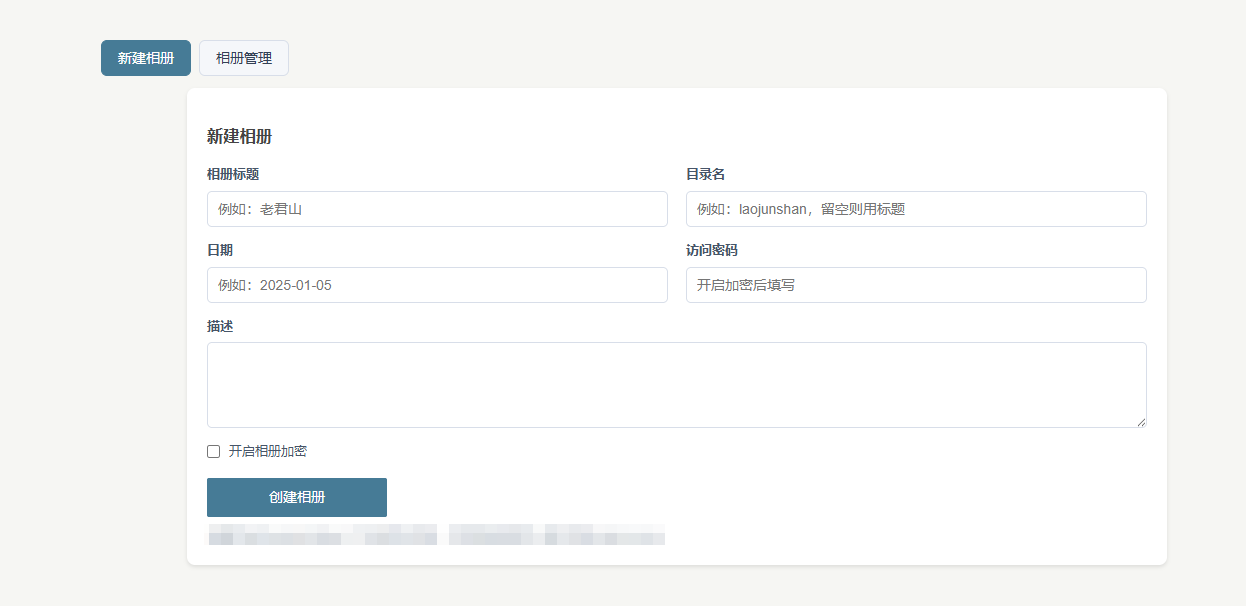
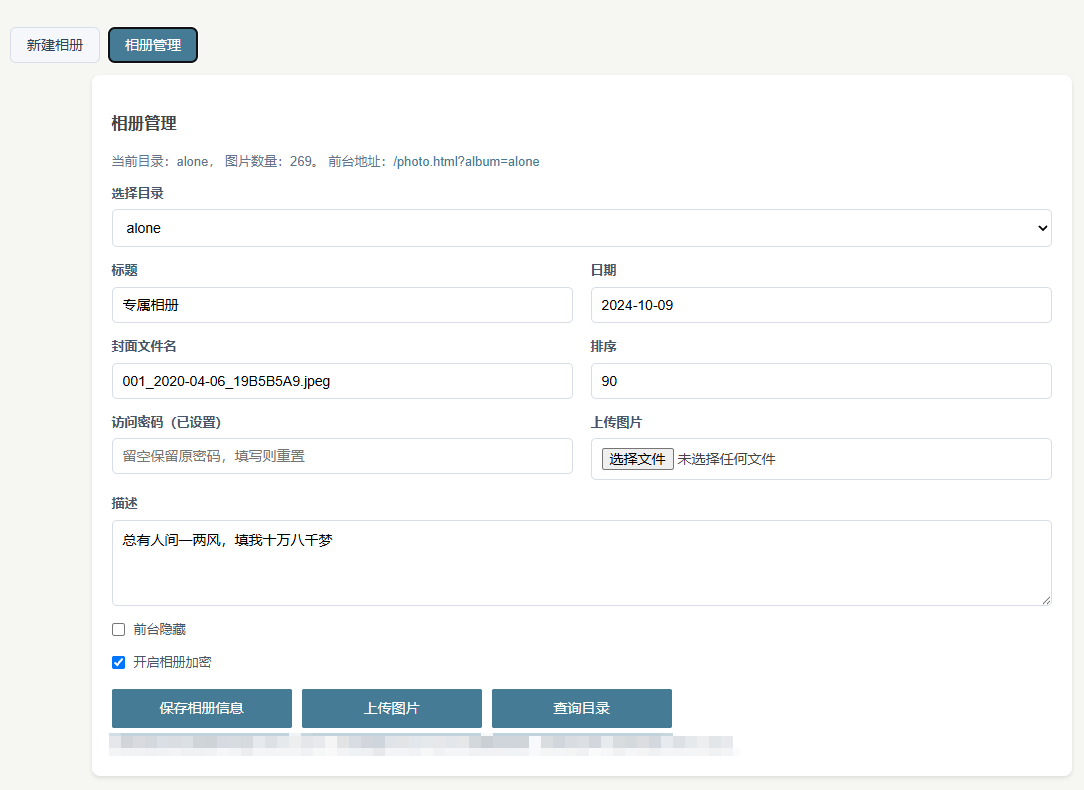
后面不管是新增相册还是给相册新增照片都可以通过后台相册插件完成了~去掉了繁琐的操作。而且前端的信息展示也优化了一下。你,看出来了吗?
有个相册展示图片还是方便很多。
好棒的创意,准备学习一下在自己的博客里也做个相册系统
搞个相册确实好玩又方便
没有自动生成缩略图吗?
在上传的时候就同步生成了webp的缩略图。
这个真不错,我也一直想搞一个,但是一直拖着没动。
我是让codex做的,很快的
值得学习一下。有时间我也再给相册升升级
时间就像牙膏,挤挤就有了
厉害了,我最近也把所有的功能都打包成插件看
把自己当成用户就好了,按照习惯来改
我倒是想搞个纯相册的程序,之前群友做了一个,支持评论那种。我看演示觉得不错。但是他说好像还有数据库问题没时间修复,所以没有发布。
让AI写一个或者找一个网上的二开一下
我试着让AI写了,目前代码给我了,但我还没有去尝试看能不能用。
说到相册,这个功能,感觉我也需要
那就做一个,心动不如行动哇